What is AIA billing?
By BuiltSum · Published · Updated
AIA billing is progress billing using the American Institute of Architects’ standardized pay-application format: the G702® Application and Certificate for Payment, which summarizes the contract sum, work completed, retainage, and the payment currently due, and the G703® Continuation Sheet, which breaks the contract into a schedule of values billed line by line. Contractors submit the package monthly; the architect or owner’s representative certifies it; payment follows the certified amount.
1 · Before App #1
Schedule of values
- Original contract
- $248,500
- + CO-01
- $6,200
- C — scheduled values
- $254,700
Approved once. The lines must sum to the contract sum to date, to the cent.
2 · Every line, every month
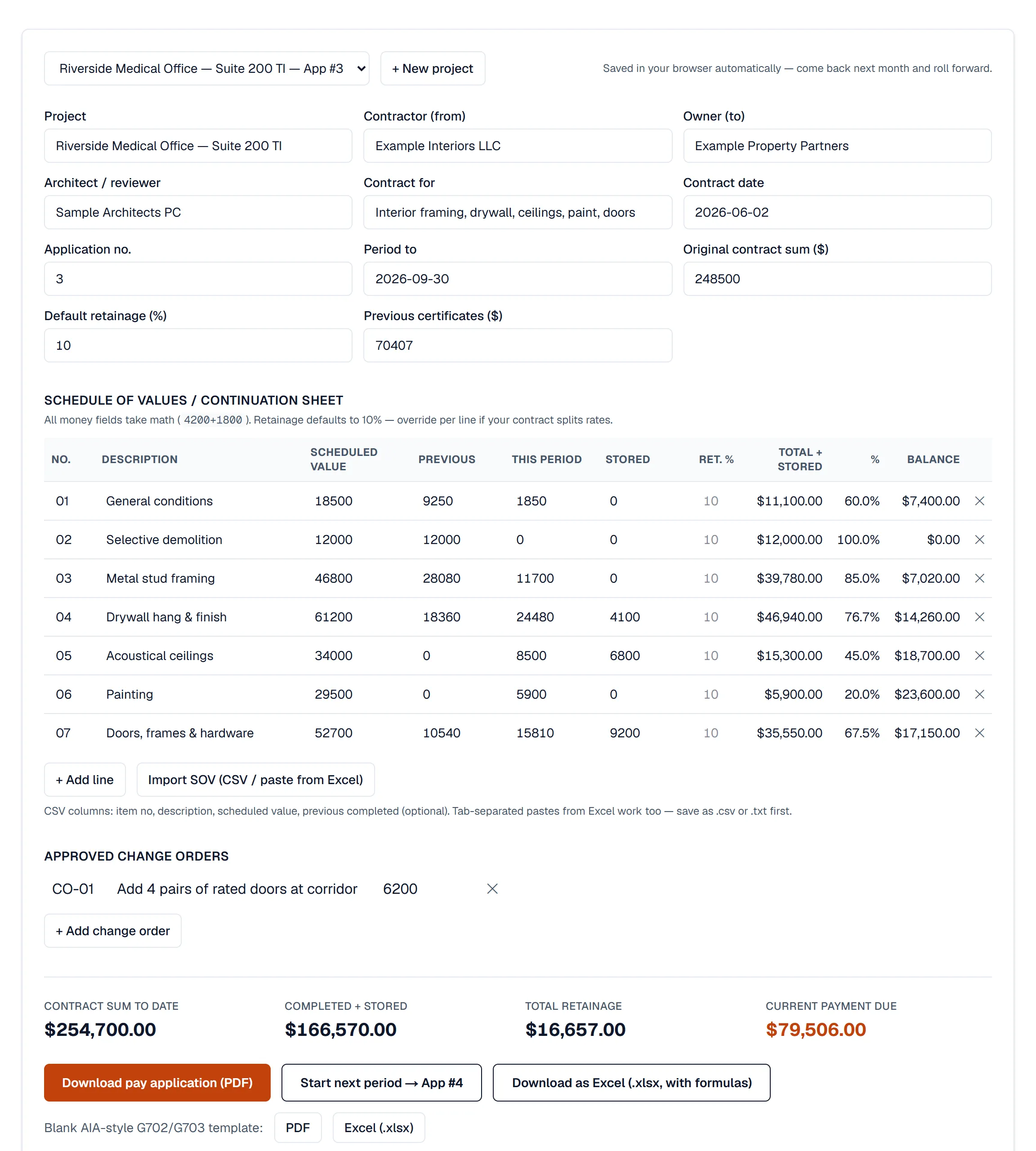
G703-style continuation sheet
- D — previous applications
- $78,230
- E — this period
- $68,240
- F — materials stored
- $20,100
- G = D + E + F
- $166,570
Percent complete is G ÷ C; balance to finish is C − G; retainage is figured on G.
3 · One page, nine lines
G702-style summary
- Line 4 — completed & stored
- $166,570
- Line 5 — retainage (10%)
- −$16,657
- Line 6 — earned less retainage
- $149,913
- Line 7 — previous certificates
- −$70,407
- Line 8 — current payment due
- $79,506
Line 4 is the continuation sheet's column G total, never a separate number.
4 · By the contract cutoff
Certification & payment
- Contractor signs
- (notarized if required)
- Architect certifies
- ≤ $79,506
- Owner pays
- certified amount
The architect can certify less than requested if they dispute progress on a line.
Next month: this period’s certified figures become App #4’s column D (previous applications) and line 7 (previous certificates). If either is retyped instead of rolled forward, the totals stop matching and the pay app bounces.
Why GCs require it
On commercial work, the general contractor bills the owner once a month and needs every subcontractor’s billing in a format that rolls up cleanly. The AIA format has been the de facto standard for decades: the same nine summary lines, the same continuation-sheet columns, the same retainage arithmetic — so an architect can certify twenty pay apps without decoding twenty invoice styles.
The G702-style summary, line by line
- Original contract sum — the value of the signed contract.
- Net change by change orders — approved additions minus deductions to date.
- Contract sum to date — line 1 + line 2.
- Total completed and stored to date — the continuation sheet’s total: all work performed plus materials stored on site, from job start through this period.
- Retainage — the percentage withheld, usually split between completed work (5a) and stored materials (5b).
- Total earned less retainage — line 4 − line 5.
- Less previous certificates for payment — everything already certified on earlier applications.
- Current payment due — line 6 − line 7. The number everyone reads first.
- Balance to finish, including retainage — line 3 − line 6.
The G703-style continuation sheet
Each schedule-of-values line carries its scheduled value, work completed in previous periods, work completed this period, materials presently stored, the total completed and stored, percent complete, balance to finish, and retainage. Two rules keep it acceptable: the scheduled values must sum exactly to the contract sum to date, and the “previous applications” column must match what was certified last month. When either drifts — usually after a change order or a hand-typed roll-forward — the pay app bounces.
Official forms vs. “AIA-style”
G702 and G703 are copyrighted; official copies are licensed through AIA Contract Documents (single-use from about $49.99, or roughly $2,199.99/user/year for a subscription). That is why billing software produces AIA-style documents — independently designed forms presenting the same functional information. Most GCs accept them; a minority of contracts require official forms, so check yours. BuiltSum is not affiliated with the AIA, and its documents are AIA-style, not official AIA Contract Documents.
Is an “AIA invoice” the same thing?
Yes. Contractors say AIA invoice, AIA pay app, AIA billing formand application for payment interchangeably. They all mean the G702-style summary plus the G703-style continuation sheet submitted for one billing period. The difference from an ordinary invoice is structural: an AIA-style invoice bills a portion of a fixed contract against an approved schedule of values, subtracts what was already certified, and withholds retainage, so the amount due is derived rather than typed. If a GC asks for an “AIA invoice template”, the free pay application generator produces exactly that document, and straight invoicing covers the small jobs that never need one.
Billing for stored materials
Column F of the G703-style sheet, Materials Presently Stored, lets you bill for material that is delivered and paid for but not yet installed, which matters on jobs with long-lead items such as switchgear, stone or custom millwork. Three rules keep it from being rejected: the contract has to allow it (many AIA A201-based contracts do, some GCs strike it), the material must be on site or in a bonded, insured off-site store with the owner named, and you attach invoices plus a stored-materials log so the reviewer can tie the value to something physical. Once installed, the amount moves out of column F and into work completed, so the same dollars are never counted twice, and retainage may apply at a different rate to stored materials than to completed work, which is why a pay app should track the two separately.
Why pay applications get sent back
A returned application usually costs a full billing cycle, because the corrected version misses the cut-off and waits for next month. The reasons repeat:
- It doesn’t tie to the last certificate. Line 7 (previous certificates) must equal what was actually certified last period, not what you billed. If the architect cut your last application, this period starts from the cut number.
- Unapproved change orders on the sheet. Pending changes belong on a separate log until they are signed. Billing them early gets the whole application rejected, not just the line.
- Percent complete the reviewer can’t see. A line claiming 80% on a floor that looks half done invites a cut across every line. Bill what is in place.
- Retainage at the wrong rate or on the wrong base. Common after a 50% step-down, or when stored materials carry a different rate than completed work.
- Missing backup. Conditional lien waivers for this period, unconditional waivers for the last one, certified payroll on prevailing-wage work, and invoices for stored materials. Most GCs list their required attachments in the subcontract; check it once and build a checklist.
- Rounding. Totals computed on the summary instead of rounded per line come out a few cents different from the continuation sheet, and the reviewer cannot certify a number that does not foot.
AIA billing vs. other ways to bill a job
| Method | What you bill | Typical use |
|---|---|---|
| AIA-style progress billing | Percent complete per schedule-of-values line, less retainage and prior certificates | Commercial and public work with a GC or architect certifying each month |
| Lump-sum invoice | The agreed price, once or in a few fixed deposits | Small residential and service jobs |
| Milestone billing | Fixed amounts when defined stages are reached | Residential builds and remodels with a draw schedule |
| Time and materials | Hours at agreed rates plus materials with markup | Repair, emergency and undefined-scope work |
| Unit price | Measured quantities times contract unit rates | Civil, paving and utility work |
The methods mix. A unit-price contract can still be billed on a G702/G703-style application, with the continuation sheet listing quantities instead of percentages, and change orders on an AIA job are often priced as time and materials before they are added to the schedule of values as new lines.
Doing it without retyping every month
The painful part of AIA billing is not the first application — it’s the tenth: rolling every line’s totals forward, keeping retainage consistent, folding in change orders, and reconciling previous certificates. You can do it free with our pay application generator (it saves your schedule of values and rolls it forward), check withholding against your state’s cap with the retainage calculator, or let BuiltSum run the whole chain from estimate to certified payment.